Git 10

[Git] error: remote origin already exists.

로컬 저장소에 파일을 생성 후 원격 저장소와 연결하려고 할 때 아래와 같은 에러가 발생했다. error: remote origin already exists. git remote add origin을 통해 로컬 저장소와 원격 저장소를 연결하려고 할 때 , 이미 로컬 저장소에 origin이라는 이름으로 연결된 원격 저장소(remote)가 등록되어 있을 때 발생하는 에러였다. ✔️해결 방법 origin 이름으로 연결된 저장소의 연결을 끊고 새로 연결해주면 된다. -- 연결을 끊는 코드 git remote remove origin -- 다시 연결 해주는 코드 git remote set-url origin 위와 같이 작성하면 에러를 해결하고 다시 잘 작동하는 것을 볼 수 있다.


Git 2025.04.27

[Git]fatal: unable to access '깃허브 repository 경로': Could not resolve host: github.com

VSCode와 git을 연결해서 git pull origin main을 진행 하다 아래 [그림1]과 같은 문제가 발생하였다. 무엇이 원인인지 찾기 위해서 구글을 킨 순간 네트워크가 연결 되지 않았다는 것을 알고, 네트워크를 연결 후 다시 pull을 받으니 문제는 해결되었다. 정리 : 해당 문제는 깃의 네트워크가 연결되지 않아서 발생한 문제였다. 네트워크를 연결한다면 문제를 해결할 수 있다.

Git 2025.04.25

[Git] On branch masterYour branch is up to date with 'origin/master'.nothing to commit, working tree clean

VSCode의 구조를 변경하다가 다시 원상 복구 후 git add . 적용 뒤 git status를 작성했는데 add .로 추가한 내용이 적용 되지 않고 아래의 메시지가 나왔다. On branch masterYour branch is up to date with 'origin/master'. ('origin/master' => '저장소 단축이름/branch명'의 형태를 가짐)nothing to commit, working tree clean파파고로 번역을 해보았다.  번역 내용 :  지점 마스터에서                   귀하의 지점은 '오리진/마스터'로 최신 상태입니다.                   아무것도 커밋하지 않고 나무를 깨끗이 청소합니다 -> nothing to commit, wo..

Git 2025.03.31

[Git] 로컬 브랜치와 원격 브랜치 연결되어 있지 발생한 에러 "There is no tracking information for the current branch. Please specify which branch you want to merge with. See git-pull(1) for details."

There is no tracking information for the current branch. Please specify which branch you want to merge with. See git-pull(1) for details.git pull If you wish to set tracking information for this branch you can do so with: git branch --set-upstream-to=origin/ master에러 발생❌ 원인 :: 현재 로컬 브랜치가 원격 브랜치와 연결(Tracking)되어 있지 않아서 Git이 어느 원격 브랜치에서 변경 사항을 가져와야 할지 모르기에 발생함.원인을 보아하니 아무래도 노트북과, 집에 있는 컴퓨터 총 2대를 ..

Git 2025.03.16

[Git] git init, git add . , git pull 이미지

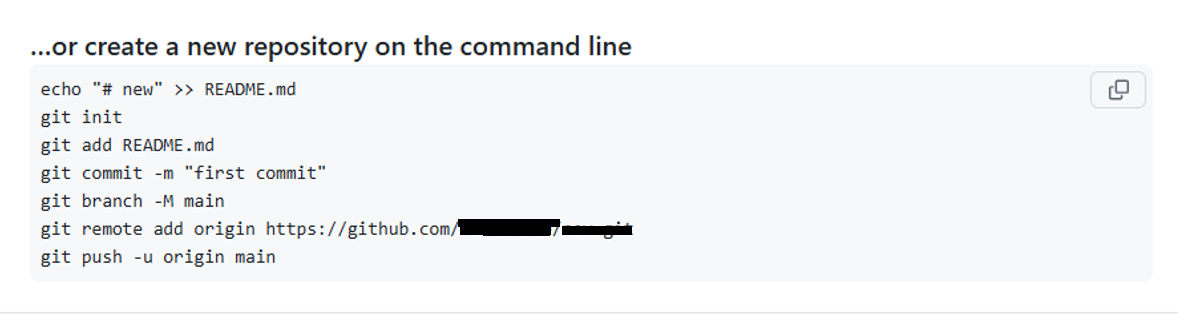
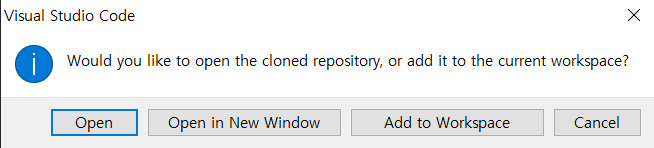
// git과 관련된 주요 내용-- 기존 존재하는 프로젝트를 다운 받는게 아닌 새로운 프로젝트를 생성 후 git의 새로운 repository와 연동시키기 위해서는 먼저 git init을 사용해야한다.git init.git 하위 디렉토리 생성함git add .커밋에 모든 파일 변경 사항을 포함git pullpull 을 통해서 내용을 받을 수 있음-- 미리 만들어진 git을 다른 컴퓨터에서 받아올 때VSCode 기준F1 누른 후 git clone 검색깃허브 계정과 연동깃허브 연동시 git repository URL 입력 및 git repository를 선택할 수 있음3-1 URL 입력 >> repository 들어간 후 code 화면에서 HTTPS의 링크 복사 후 VSCode에서 입력3-2 git repos..

Git 2025.03.16

[Git] git 에러 "non-fast-forward", "warning: in the working copy of 'README.md', LF will be replaced by CRLF the next time Git touches it"

https://easy-6.tistory.com/30 해당 내용을 통해 git과 VSCode를 연결하여 repository 생성 및 연결하는 걸 볼 수 있다. # gitHub 와 VSCode 연결 1. git init (초창기)  2. git hub에서 repository 생성  3. git add .  4. git commit -m "first commit" 5. git branch -M main // branch를 main으로 생성  if git branch -m master로 작성했다면 branch명이 master로 생성 6. git remote add origin https://github.com/깃계정명/repository명.     (git remote add origin 나의 reposito..

Git 2025.03.16

[Git] Git push 관련 에러

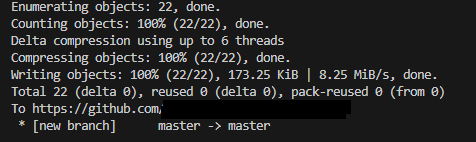
작업을 진행한 뒤 아래의 링크에 나와있는 순서대로 진행하였다.  https://easy-6.tistory.com/33 [git] VSCode와 git의 연동 및 git 내용1.VSCode를 설치한다. https://code.visualstudio.com/download Download Visual Studio Code - Mac, Linux, WindowsVisual Studio Code is free and available on your favorite platform - Linux, macOS, and Windows. Download Visual Studio Code to experience aeasy-6.tistory.com VSCode에서 git에 올릴 때 순서 git add . // 1번째..

Git 2025.03.11

[Git] VSCode와 git의 연동 및 git 내용

1.VSCode를 설치한다. https://code.visualstudio.com/download Download Visual Studio Code - Mac, Linux, WindowsVisual Studio Code is free and available on your favorite platform - Linux, macOS, and Windows. Download Visual Studio Code to experience a redefined code editor, optimized for building and debugging modern web and cloud applications.code.visualstudio.com 2. git을 설치해줘야한다. 본인의 경우는 OS를 윈도우로 사용하기..

Git 2025.03.09

[Git] git허브 설정 및 react 파일 올리기

깃허브에서 처음 repository를 생성 후, VSCode와 연동 하려고 하였다. 아래는 그 과정이다.  1. git 설치 후 Git Bash에서 환경 설정을 해줌  1.1) 환경설정 1단계 git config --global user.name "사용자 이름 " 예시 >> git config --global user.name "hong" 1.2) 환경 설정 2단계git config --global user.email"사용자가 깃허브에 가입한 이메일"예시 >> git config -- global user.email"hong@gmail.com" 1.3) 환경 설정 확인 git config --list해당 코드를 통해서 user.name과 user.email이 잘 들어있나 확인할 수 있음 이때 잘 보..

Git 2025.02.28

[Git] fetch 문제

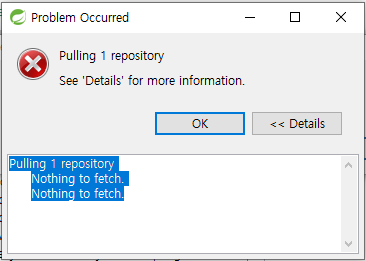
연습용 프로젝트 작성 후 git에 올렸더니 해당 문제가 발생하였다. 분명 어디서 봤던 문제였는데 기억이 잘 나질 않았다. 결국 구글 검색 후 원인을 알게 되었다. 원인은 해당 프로젝트의 remote에 fetch가 잡혀있지 않아서 발생한 문제였다.  1️⃣ Git repository 클릭 후 property 들어가야함  2️⃣remote  내부에 fetch가 존재하는지 안하는지 확인해야함 3️⃣ open을 통해 config 파일 열어야함 4️⃣ config 파일의 remote 부분의 [remote "origin"] 부분에 fetch = +refs/heads/*:refs/remotes/origins/*을 추가 5️⃣ 다시 properties 화면의 add Entry 클릭 후 Key에는 remote.origi..

Git 2025.02.20